7 Tips for Choosing the Best Directional Antenna

A weak wireless link can make a capable network feel unreliable. A Directional Antenna helps focus radio energy toward a chosen point, but choosing one involves more than picking the highest gain on a product page. Frequency range, beamwidth, polarization, connector type, mounting options, and the path between the antenna and its target all matter. A rooftop unit aimed across a valley faces different conditions from a compact antenna serving a workshop.

The scale of connectivity makes those choices significant. The GSMA’s Mobile Economy 2024 report estimates that mobile technologies and services contributed 5.4% of global GDP in 2023, or $5.7 trillion. That figure does not measure antenna performance, but it shows how much depends on reliable wireless infrastructure. Antenna theorist Constantine A. Balanis describes an antenna as “a transitional structure between free-space and a guiding device.” That transition deserves careful thought.

This guide presents seven practical tips for choosing the best Directional Antenna. It covers matching frequency bands, interpreting gain and beamwidth, checking polarization, and assessing cable loss and installation conditions. A compass, a clear line of sight, and a signal meter can help during setup. Small details matter.

Specifications still have limits. Real-world performance can fall short when trees, walls, interference, or poor alignment alter the signal path. I would not treat a published gain figure as a promise. Compare the manufacturer’s data with your site conditions, and leave room to reassess after installation.

7 Tips for Choosing the Best Directional Antenna

Identify the Frequency Bands and Signal Sources You Need

Before choosing a directional antenna, identify the signal you actually need to receive or transmit. Check the equipment manual, service documentation, or a reliable frequency listing for its operating band. A signal at 900 MHz needs a different antenna design from one at 2.4 GHz. “Close enough” can mean weaker reception and wasted time.

Tip: Write down each frequency and signal source. Note whether you need one source or several, and whether they are fixed or move around. A directional antenna focuses its coverage, so aiming toward the wrong tower, access point, or transmitter can make reception worse. If you are unsure, compare readings at a few positions before mounting it permanently.

For multiple sources, check whether they share a supported band; one antenna may not perform equally well across all frequencies. Look at the antenna’s stated frequency range, gain, and polarization, then compare those details with your device and signal conditions. Nearby walls, trees, and other transmitters can affect results. Real-world readings may be messier than the specifications suggest. That is worth remembering. A simple frequency scan or a careful test with temporary mounting can reveal a mismatch before you drill holes or route cable.

7 Tips for Choosing the Best Directional Antenna - Identify the Frequency Bands and Signal Sources You Need

Tip Signal source and example band Approx. wavelength Directional antenna guidance What to verify
1. Identify the exact service FM broadcast: commonly 88–108 MHz About 2.8–3.4 m A Yagi-style antenna can improve reception from a known transmitter direction. Confirm the local station frequency and transmitter location; broadcast allocations can vary by country.
2. Check the actual channel range Terrestrial TV: VHF and UHF; in the U.S., current broadcast allocations include 54–216 MHz and 470–608 MHz, with channel gaps Roughly 0.5–5.6 m across these ranges Choose a TV antenna designed for the needed VHF, UHF, or combined range. Use the broadcast channel frequencies for your location, not just the channel numbers; allocations differ internationally.
3. Match the antenna to the band Wi-Fi: 2.4 GHz (about 2.400–2.4835 GHz); 5 GHz and 6 GHz ranges depend on local rules About 12.5 cm at 2.4 GHz; 5–6 cm near 5–6 GHz A directional panel or other band-specific antenna may help connect to a fixed access point. Check supported frequencies, channel restrictions, connector compatibility, and whether the antenna covers all bands you use.
4. Allow for cellular band variation Cellular LTE and 5G sub-6 networks use multiple bands across roughly 600 MHz to 6 GHz, depending on country and carrier About 5 cm–50 cm across this broad range A directional panel or log-periodic antenna can be useful when aiming toward a known cell site. Check the modem’s supported bands and the local network bands; “5G” alone does not identify a frequency.
5. Confirm the signal’s polarization Point-to-point radio links and broadcast services can use horizontal, vertical, or dual polarization Depends on the operating frequency Align the antenna polarization with the transmitting antenna; a mismatch can reduce received signal strength. Check the transmitter or service documentation and maintain the correct antenna orientation.
6. Balance gain with beamwidth Fixed links, remote access points, and distant broadcast transmitters Depends on the selected band Higher-gain designs generally have a narrower beam and require more precise aiming. Compare gain and beamwidth together; consider how accurately and steadily the antenna can be aimed.
7. Check whether directionality suits the source GNSS positioning signals, including GPS L1 at 1575.42 MHz About 19 cm Ordinary GNSS receivers typically need a broad view of the sky; a narrow directional antenna is generally not suitable for routine positioning. Use a directional GNSS antenna only for a specialized application that supports tracking or controlled reception.

Wavelengths are approximate, calculated using the speed of light. Frequency allocations and permitted equipment vary by region; verify local regulations and the exact frequencies used by the signal source.

Match Antenna Gain and Beamwidth to Your Coverage Area

Choosing antenna gain begins with the shape of the area you need to serve. A long, narrow corridor may suit a higher-gain antenna with a tighter beam. A broad yard or several nearby buildings may need a wider beam instead. Higher gain concentrates energy; it does not automatically improve every connection. Distance, obstacles, and the receiving device still matter.

Picture a warehouse link aimed through a loading bay. A narrow beam can reduce spillover, but a small mounting error may push coverage off the far doorway. A wider beam is more forgiving, though signal strength may fall near the edges. Check the antenna’s horizontal and vertical beamwidth, not just its gain rating. Small details matter. Walls and metal shelving can also create dead spots that a specification sheet will not show.

Sketch the coverage area and mark the farthest points, then compare those needs with the antenna’s beam pattern. If possible, test signal levels at the center and edges after mounting. Keep the antenna securely aimed, and recheck it if the mount can shift in wind. Planning from a flat map is imperfect; real buildings rarely behave so neatly. A modest gain choice with reliable alignment may serve better than the highest number on a product label.

Assess Mounting Location, Terrain, and Line of Sight

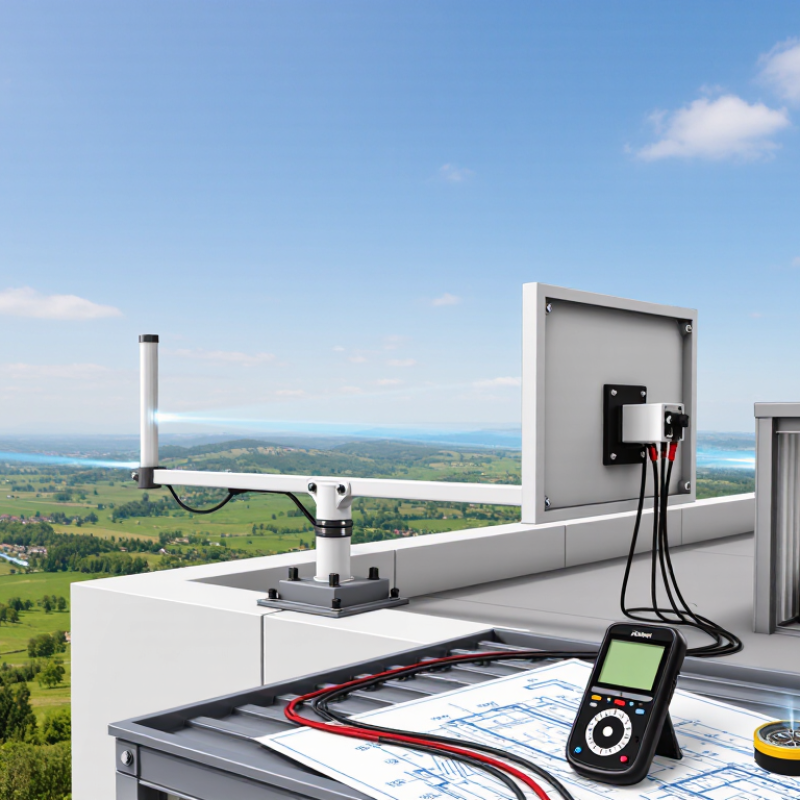
Choose a mounting point only after walking the full route between antenna and transmitter. A rooftop corner may look clear, yet nearby trees, chimneys, or a rising ridge can block the signal. Record the antenna height and sketch the terrain profile. ITU-R Recommendation P.530-18 (2021), a standard for terrestrial line-of-sight link planning, includes methods for assessing diffraction and propagation effects. A map pin alone is not enough. Check the path from the antenna’s actual height, not just ground level.

Leave room around the direct path. RF planners commonly use 60% clearance of the first Fresnel zone as a practical target. For a 5 GHz link spanning 1 km, that zone reaches about 3.9 m at the midpoint, so 60% clearance is roughly 2.3 m. This is an estimate, not a guarantee; ITU-R P.530-18 provides more detailed path-planning methods. Small details matter. Test at the intended mounting height, then check again after leaves grow or wet weather changes the site. A clear-day signal test can mislead. I’d recheck any route that barely clears a roofline, even when the signal initially seems stable.

Check Polarization, Connector, and Equipment Compatibility

Before choosing a directional antenna, check its polarization against the equipment at the other end. A vertically polarized antenna should generally face a vertically polarized counterpart. If one is turned sideways, signal strength can drop, even when both antennas point accurately toward each other. Small details matter. Check the antenna’s documentation and the mounting position, not just its shape. In a real installation, nearby metal rails or a tilted bracket can also change the intended alignment.

Connector compatibility deserves more than a quick visual check. Two plugs may look similar yet use different coupling styles or electrical specifications. Confirm the connector type, cable impedance, and supported frequency range for the antenna and radio. An adapter can solve a physical mismatch, but each extra connection may add loss or create another point to loosen. I find it tempting to focus on antenna gain first; that can be the wrong priority if the cable cannot connect properly.

Check the complete equipment path: antenna, coaxial cable, radio, and any mounting hardware. Confirm that the radio supports the antenna’s frequency and that the cable suits the installation length. A long cable run may weaken the signal. It is easy to overlook. If specifications are unclear, ask the equipment supplier or a qualified installer before buying. Verify the details in writing, especially when replacing only one part of an existing setup.

Compare Durability, Weather Resistance, and Installation Requirements

A directional antenna may look rugged, yet its weakest point is often a connector or mounting bracket. Check the manufacturer’s stated operating temperature, wind rating, and enclosure protection before comparing models. IEC 60529 defines IP ratings: IP65 indicates dust-tight protection and resistance to water jets, but it does not certify resistance to salt corrosion, ultraviolet exposure, or sustained wind. Those differences matter on a coastal roof or an exposed mast. Small details count.

Weather risk is not theoretical. NOAA’s 2023 Billion-Dollar Weather and Climate Disasters report recorded 28 U.S. events, with estimated losses of $92.9 billion. That figure is national, not an antenna failure rate, but it shows why local exposure deserves attention. Check whether the site faces gusts, icing, heavy rain, or corrosive air. Then confirm the mast and brackets can carry the antenna’s projected wind load. Plan for a clear line of sight and safe access for alignment and maintenance. Seal outdoor connections, use a drip loop, and secure the cable against movement. A neat installation can still fail if water tracks along a cable. Recheck the mounting after severe weather; this step is easy to overlook.

7 Tips for Choosing the Best Directional Antenna

Compare durability, weather resistance, and installation requirements before you buy.

Understanding IP Water-Protection Ratings

IPX ratings describe resistance to water ingress under specified test conditions; they do not measure UV resistance, corrosion resistance, or overall antenna durability. IPX8 test conditions are agreed between the manufacturer and user.

  1. Check the operating frequency: Choose an antenna designed for the frequencies used by your system.
  2. Compare gain and beamwidth: Higher gain generally means a narrower direction of coverage and more precise aiming.
  3. Review the water-protection rating: Match the IP rating to the expected exposure; confirm the exact test conditions for IPX8.
  4. Inspect materials and finishes: Look for corrosion-resistant components and UV-stable outdoor materials when the antenna will be exposed to the elements.
  5. Assess wind exposure: Check the antenna’s wind-load specifications and ensure the mast and mounting hardware are suitable for the site.
  6. Plan the installation: Consider mounting space, access for alignment, cable routing, and whether extra support or grounding is required.
  7. Verify local requirements: Follow applicable building, electrical, and lightning-protection rules, and keep the installation safely accessible.

Article Source:

Find the Right Repair Product for Your Project

Need to find the most appropriate product for the needs of your project? We can help because we have over 70 years of experience servicing the industry with every kind of project, from Do-it-yourself projects to large skyscrapers. Package Pavement has the experience, the knowledge and the products to help every project succeed.

Quikrete Repair Products
Legend
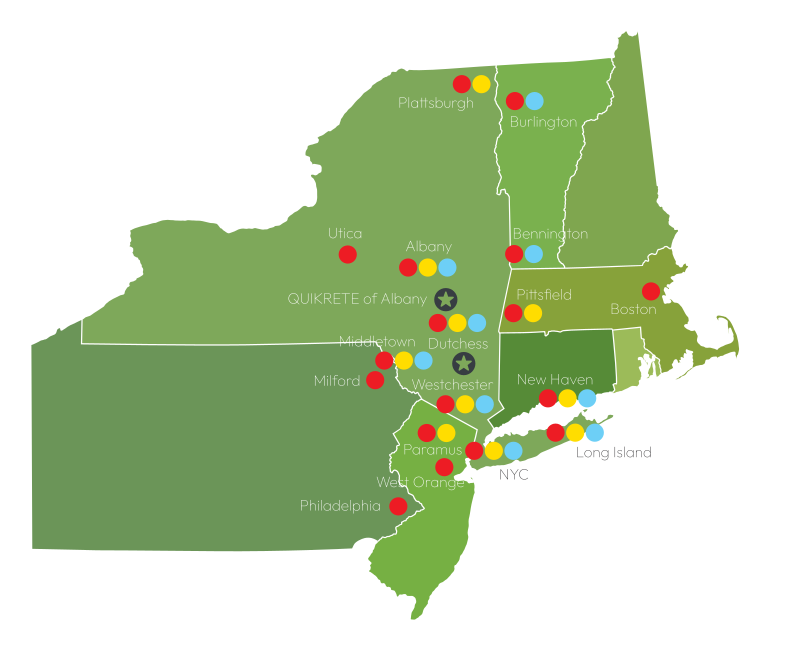
Package Pavement has two convenient locations in Stormville, NY (Dutchess County) and Ravena, NY (Greene County) to serve the Northeastern Region with bagged concrete, blacktop, mortar, and repair products. This map gives a general idea of where we service and the product lines we offer.
Package Pavement Products
Quikrete Products
Spec Mix Products
map

Our Brands Websites